主题
Java IO流完全指南:字节流、字符流与序列化
目录
一、IO流基础概念
1.1 什么是IO流
专业角度定义: 将数据从一个设备传输到另外一个设备上的技术。
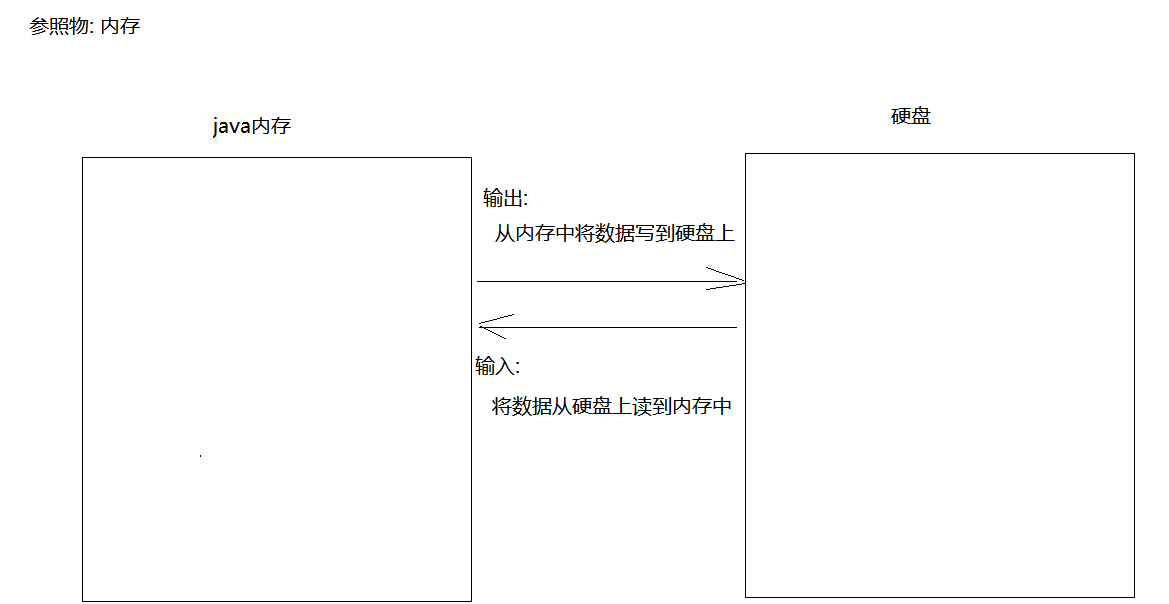
JavaSE角度定义: 将数据从内存写到硬盘上,然后还能从硬盘上将数据读回来的技术。
1.2 输入与输出
- 输出(Output): 将数据从内存中写到硬盘上(谁发数据谁就是输出)
- 输入(Input): 将数据从硬盘上读到内存中(谁接数据谁就是输入)
1.3 IO流分类
| 分类 | 说明 | 适用场景 |
|---|---|---|
| 字节流 | 一切皆字节(万能流),侧重复制操作 | 文件复制、图片、视频等二进制文件 |
| 字符流 | 主要对文本文档进行读写操作 | 文本文件读写 |
IO流四大基类:
- OutputStream(字节输出流)
- InputStream(字节输入流)
- Writer(字符输出流)
- Reader(字符输入流)
二、字节流
2.1 FileOutputStream(字节输出流)
2.1.1 概述
- 作用: 往硬盘上写数据
- 父类: OutputStream(抽象类)
2.1.2 构造方法
| 构造方法 | 说明 |
|---|---|
FileOutputStream(File file) | 创建文件输出流,写入到指定File对象 |
FileOutputStream(String path) | 创建文件输出流,写入到指定路径文件 |
FileOutputStream(String path, boolean append) | append为true时追加写入,不覆盖原文件 |
2.1.3 常用方法
| 方法 | 说明 |
|---|---|
write(int a) | 一次写一个字节 |
write(byte[] bytes) | 一次写一个字节数组 |
write(byte[] bytes, int offset, int count) | 一次写一个字节数组的一部分 |
close() | 关闭资源 |
2.1.4 特点
- 如果文件不存在,运行时会自动创建
- 默认情况下,每次执行都会产生新文件,覆盖老文件
2.1.5 代码示例
示例1:一次写一个字节
java
FileOutputStream fos = new FileOutputStream("day14_io/1.txt");
fos.write(97);  // 写入字符 'a'
fos.close();
示例2:一次写一个字节数组
java
FileOutputStream fos = new FileOutputStream("day14_io/1.txt");
byte[] bytes = {97, 98, 99, 100};
fos.write(bytes);  // 写入 "abcd"
fos.close();
示例3:写入字符串
java
FileOutputStream fos = new FileOutputStream("day14_io/1.txt");
byte[] bytes = "我爱中国".getBytes();
fos.write(bytes);
fos.close();
示例4:换行与续写
java
FileOutputStream fos = new FileOutputStream("day14_io/1.txt", true);
fos.write("白日依山尽\r\n".getBytes());
fos.write("黄河入海流\r\n".getBytes());
fos.write("欲穷千里目\r\n".getBytes());
fos.write("更上一层楼\r\n".getBytes());
fos.close();
换行符说明:
- Windows:
\r\n - Linux:
\n - Mac OS:
\r
2.2 FileInputStream(字节输入流)
2.2.1 概述
- 作用: 读数据,将硬盘上的数据读到内存中
- 父类: InputStream(抽象类)
2.2.2 构造方法
| 构造方法 | 说明 |
|---|---|
FileInputStream(File file) | 创建文件输入流,读取指定File对象 |
FileInputStream(String path) | 创建文件输入流,读取指定路径文件 |
2.2.3 常用方法
| 方法 | 说明 |
|---|---|
int read() | 一次读一个字节,返回读取的字节 |
int read(byte[] bytes) | 一次读一个字节数组,返回读取的字节个数 |
int read(byte[] bytes, int offset, int count) | 一次读一个字节数组的一部分 |
close() | 关闭资源 |
2.2.4 代码示例
示例1:一次读一个字节
java
FileInputStream fis = new FileInputStream("day14_io/2.txt");
int len = 0;
while((len = fis.read()) != -1) {
    System.out.println((char) len);
}
fis.close();
示例2:一次读一个字节数组
java
FileInputStream fis = new FileInputStream("day14_io/2.txt");
byte[] bytes = new byte[1024];
int len = 0;
while((len = fis.read(bytes)) != -1) {
    System.out.println(new String(bytes, 0, len));
}
fis.close();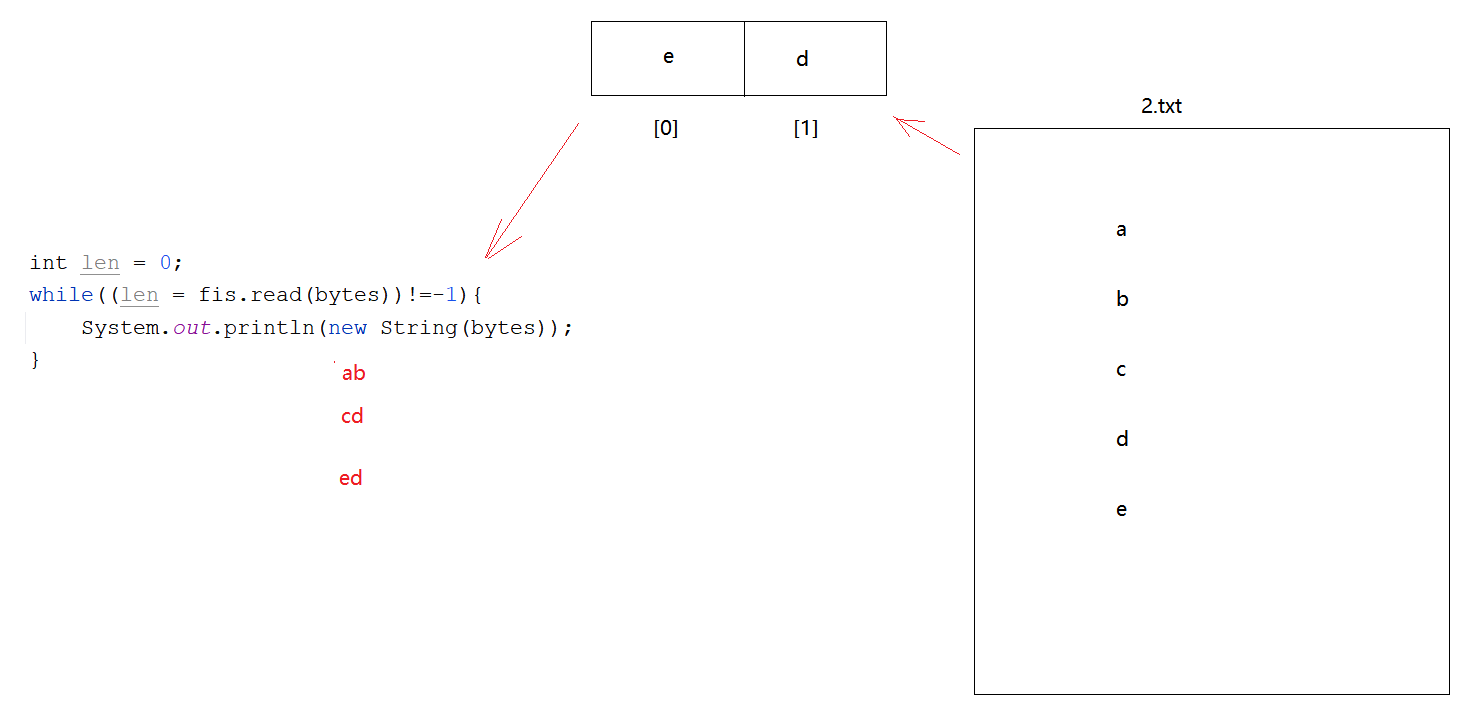
2.2.5 注意事项 ⭐
- 流中的数据读完之后,就不能再继续读了,如果还想重新读,需要再new一个对象
- 读取的过程中,不要连续写多个read
- 流关闭之后,不能再次使用,否则会报错:
java.io.IOException: Stream Closed
2.3 字节流实现文件复制
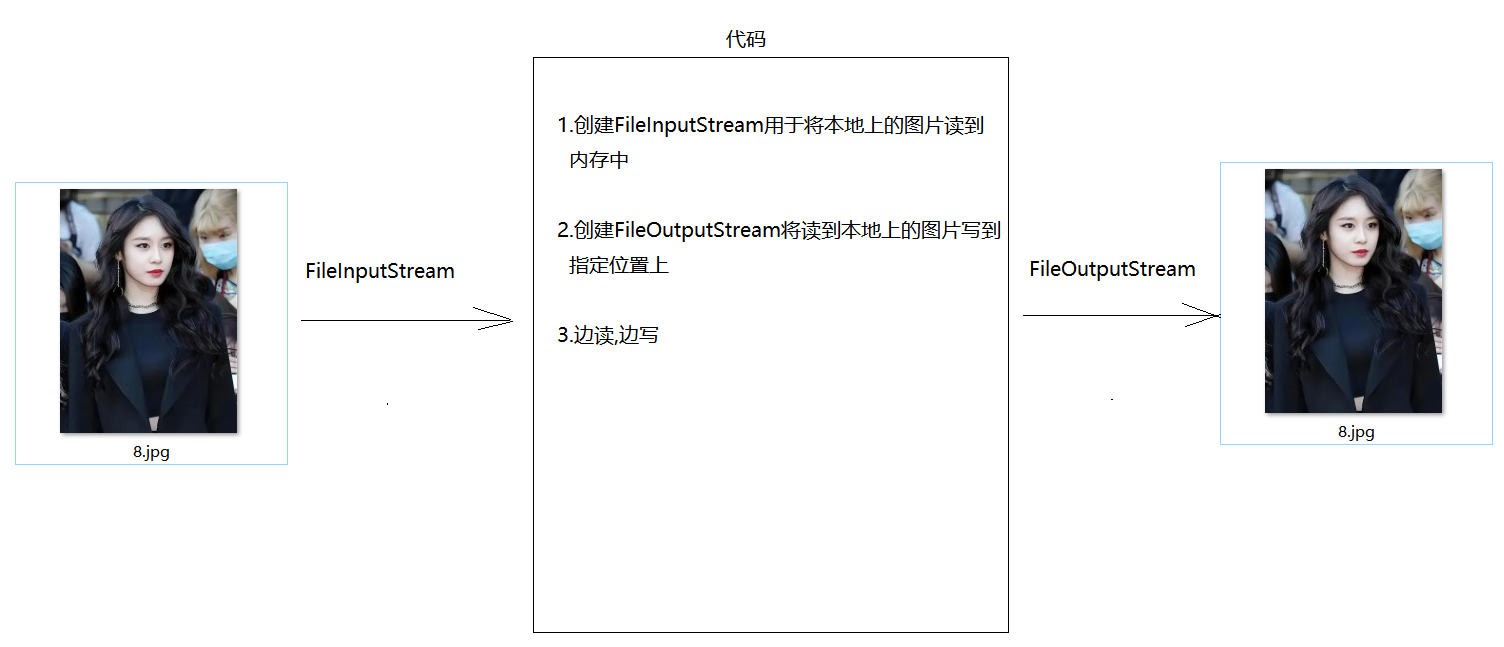
2.3.1 复制原理
2.3.2 代码实现
java
public class Demo03Copy {
    public static void main(String[] args) throws Exception {
        FileInputStream fis = new FileInputStream("F:\\idea\\io\\8.jpg");
        FileOutputStream fos = new FileOutputStream("F:\\idea\\io\\智妍.jpg");

        byte[] bytes = new byte[1024];
        int len = 0;
        while((len = fis.read(bytes)) != -1) {
            fos.write(bytes, 0, len);
        }

        fos.close();
        fis.close();
    }
}
复制流程:
- 创建输入流,读取源文件
- 创建输出流,写入目标文件
- 创建字节数组(一般长度为1024或其倍数)
- 边读边写
- 关闭流(先开后关)
三、字符流
3.1 为什么需要字符流
字节流读取中文的问题:
- 一个汉字在GBK中占2个字节
- 一个汉字在UTF-8中占3个字节
- 字节流是万能流,但读取中文时可能出现乱码
解决方案: 使用字符流,将文本文档内容看成一个一个的字符进行操作。
3.2 FileReader(字符输入流)
3.2.1 概述
- 作用: 读数据
- 父类: Reader(抽象类)
3.2.2 构造方法
| 构造方法 | 说明 |
|---|---|
FileReader(File file) | 创建字符输入流,读取指定File对象 |
FileReader(String path) | 创建字符输入流,读取指定路径文件 |
3.2.3 常用方法
| 方法 | 说明 |
|---|---|
int read() | 一次读一个字符 |
int read(char[] chars) | 一次读一个字符数组,返回读取个数 |
int read(char[] chars, int offset, int count) | 一次读一个字符数组的一部分 |
close() | 关闭资源 |
3.2.4 代码示例
示例1:一次读一个字符
java
FileReader fr = new FileReader("day14_io/3.txt");
int len = 0;
while((len = fr.read()) != -1) {
    System.out.println((char) len);
}
fr.close();
示例2:一次读一个字符数组
java
FileReader fr = new FileReader("day14_io/3.txt");
char[] chars = new char[1024];
int len = 0;
while((len = fr.read(chars)) != -1) {
    System.out.println(new String(chars, 0, len));
}
fr.close();
3.3 FileWriter(字符输出流)
3.3.1 概述
- 作用: 写数据
- 父类: Writer(抽象类)
3.3.2 构造方法
| 构造方法 | 说明 |
|---|---|
FileWriter(File file) | 创建字符输出流,写入到指定File对象 |
FileWriter(String path) | 创建字符输出流,写入到指定路径文件 |
FileWriter(String path, boolean append) | append为true时追加写入 |
3.3.3 常用方法
| 方法 | 说明 |
|---|---|
write(int c) | 一次写一个字符 |
write(char[] cbuf) | 一次写一个字符数组 |
write(char[] cbuf, int off, int len) | 一次写一个字符数组的一部分 |
write(String str) | 一次写一个字符串 |
flush() | 刷新缓冲区 |
close() | 关闭资源 |
3.3.4 代码示例
java
FileWriter fw = new FileWriter("day14_io/4.txt", true);
fw.write("风萧萧兮易水寒\r\n");
fw.write("壮士一去兮不复还\r\n");
fw.close();
3.4 flush()与close()的区别 ⭐⭐⭐
| 方法 | 功能 | 后续使用 |
|---|---|---|
flush() | 将缓冲区中的数据刷到文件中 | 流对象还能继续使用 |
close() | 先刷新,后关闭 | 流对象不能继续使用 |
重要说明: 字符输出流底层有一个缓冲区,需要将内容从缓冲区刷到文件中。
3.5 IO异常处理
3.5.1 JDK7之前的方式
java
FileWriter fw = null;
try {
    fw = new FileWriter("day14_io/4.txt");
    fw.write("我爱祖国");
} catch (Exception e) {
    e.getStackTrace();
} finally {
    if (fw != null) {
        try {
            fw.close();
        } catch (IOException e) {
            e.printStackTrace();
        }
    }
}
3.5.2 JDK7的try-with-resources
java
try (FileWriter fw = new FileWriter("day14_io/4.txt")) {
    fw.write("我爱我的祖国");
} catch (Exception e) {
    e.printStackTrace();
}
要求:
- 资源必须实现
java.io.Closeable接口 - 在try子句中声明并初始化资源对象
- 该资源对象必须是final的
3.5.3 JDK9的改进
java
FileWriter fw = new FileWriter("day14_io/4.txt");
try (fw) {
    fw.write("我爱我的祖国111");
} catch (Exception e) {
    e.printStackTrace();
}
改进: 可以直接使用已初始化的资源对象。
四、序列化流与打印流
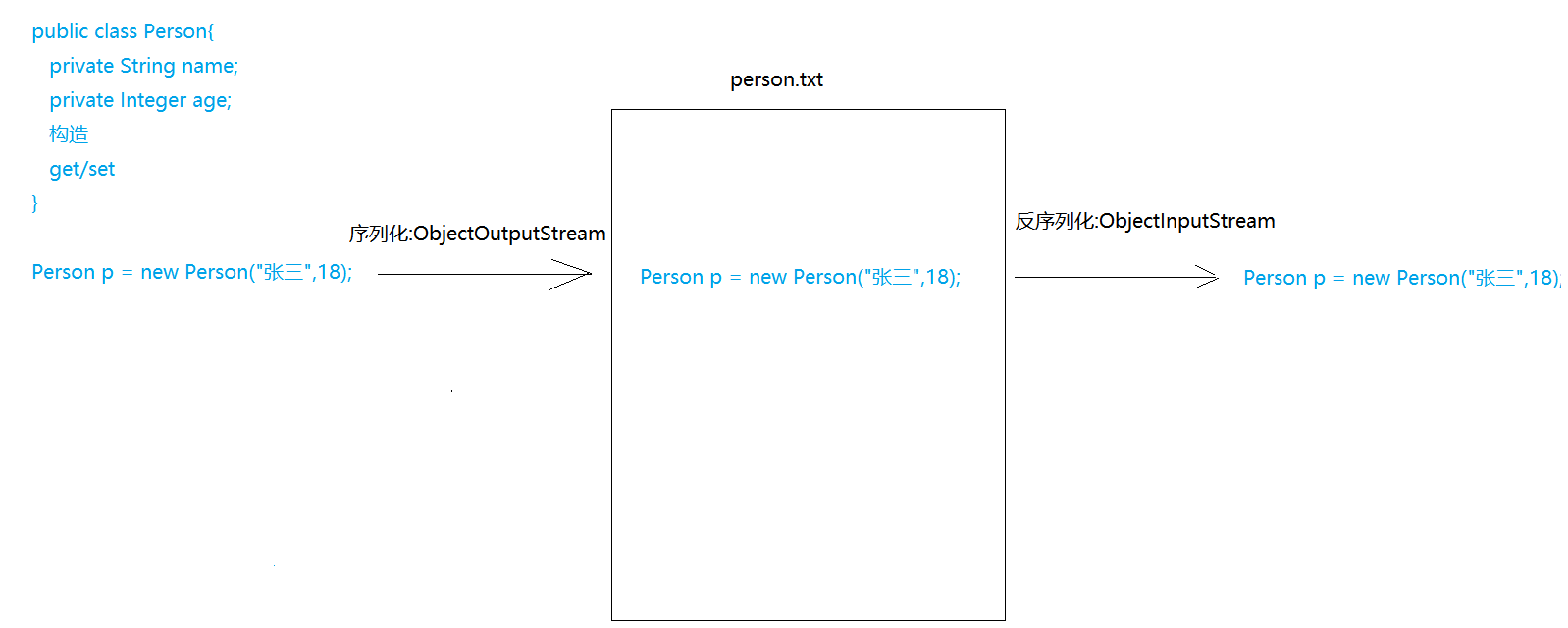
4.1 序列化流(ObjectOutputStream)
4.1.1 概述
- 作用: 写对象
- 父类: OutputStream
4.1.2 构造方法
| 构造方法 | 说明 |
|---|---|
ObjectOutputStream(OutputStream os) | 创建序列化流对象 |
4.1.3 常用方法
| 方法 | 说明 |
|---|---|
writeObject(Object obj) | 写入对象 |
4.1.4 代码示例
Person类:
java
public class Person implements Serializable {
    private static final long serialVersionUID = 42L;
    private String name;
    private Integer age;

    public Person() {}

    public Person(String name, Integer age) {
        this.name = name;
        this.age = age;
    }

    @Override
    public String toString() {
        return "Person{name='" + name + "', age=" + age + "}";
    }
}
序列化操作:
java
ObjectOutputStream oos = new ObjectOutputStream(
    new FileOutputStream("day14_io/person.txt"));
Person p1 = new Person("张三", 18);
oos.writeObject(p1);
oos.close();
重要: 如果想要序列化一个对象,此对象必须实现 Serializable 接口。
4.2 反序列化流(ObjectInputStream)
4.2.1 概述
- 作用: 读对象
- 父类: InputStream
4.2.2 构造方法
| 构造方法 | 说明 |
|---|---|
ObjectInputStream(InputStream is) | 创建反序列化流对象 |
4.2.3 常用方法
| 方法 | 说明 |
|---|---|
readObject() | 读取对象 |
4.2.4 代码示例
java
ObjectInputStream ois = new ObjectInputStream(
    new FileInputStream("day14_io/person.txt"));
Object o = ois.readObject();
Person p = (Person) o;
System.out.println(p);
ois.close();
4.3 序列号冲突问题 ⭐⭐⭐
4.3.1 问题描述
如果修改了对象的源码,没有重新序列化,直接反序列化,会出现"序列号冲突问题"。
4.3.2 原因
修改源代码后,class文件中的新序列号和文件中存储的序列号不一致。
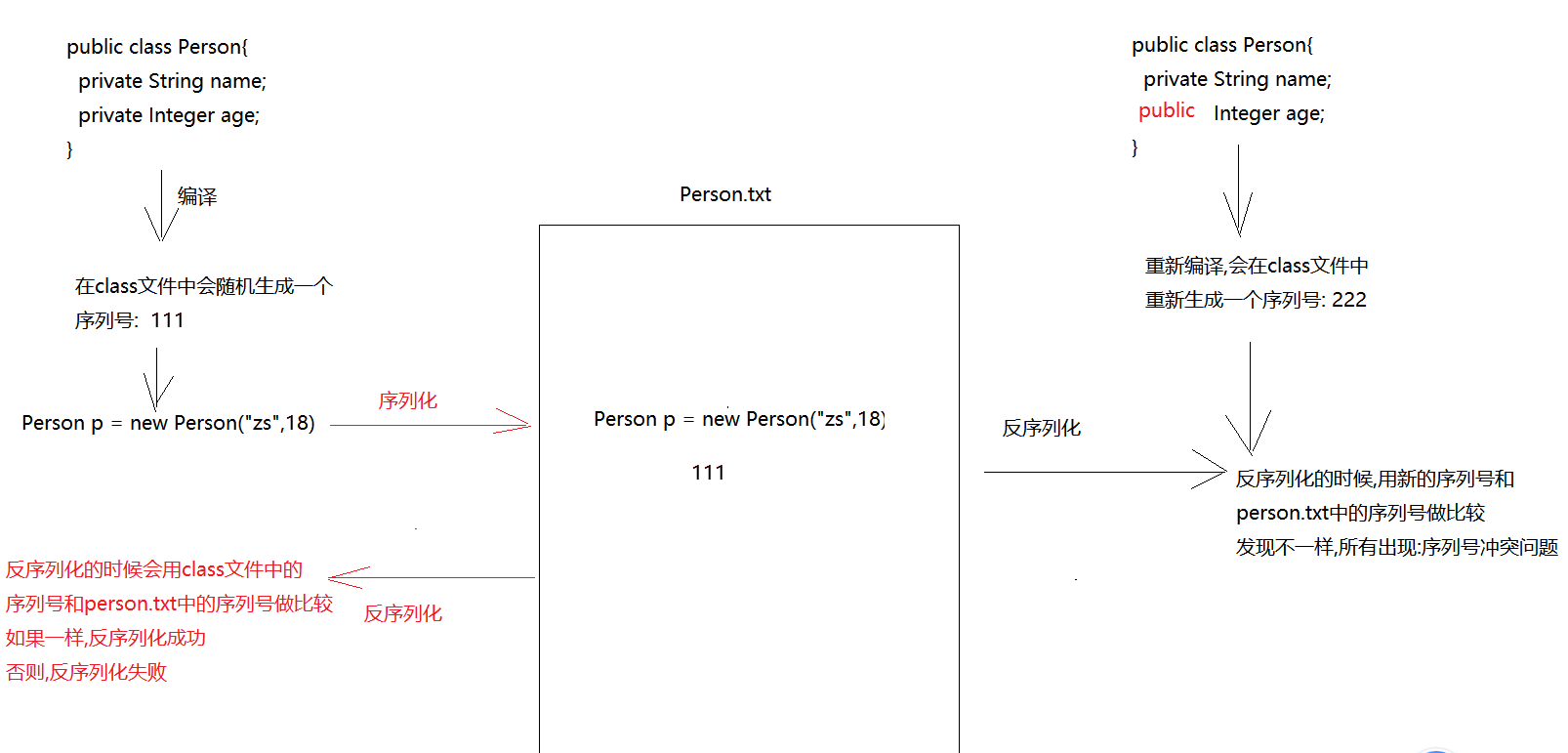
4.3.3 解决方案
方案1: 修改源码后,重新序列化
方案2(推荐): 在被操作的对象中将序列号定死
java
static final long serialVersionUID = 42L;4.4 反序列化多个对象
4.4.1 问题
如果读取对象的次数和存储的对象个数不一致,会出现 EOFException(文件意外到达结尾异常)。
4.4.2 解决方案
将多个对象放到一个集合对象中,然后将这一个集合对象序列化到文件。
java
ObjectOutputStream oos = new ObjectOutputStream(
    new FileOutputStream("day14_io/person.txt"));

Person p1 = new Person("张三", 18);
Person p2 = new Person("李四", 20);
Person p3 = new Person("王五", 22);

ArrayList<Person> list = new ArrayList<>();
list.add(p1);
list.add(p2);
list.add(p3);

oos.writeObject(list);
oos.close();
读取集合:
java
ObjectInputStream ois = new ObjectInputStream(
    new FileInputStream("day14_io/person.txt"));
Object o = ois.readObject();
ArrayList<Person> list = (ArrayList<Person>) o;
for (Person person : list) {
    System.out.println(person);
}
ois.close();
4.5 打印流(PrintStream)
4.5.1 概述
- 作用: 将数据打印到控制台或指定文件
- 父类: OutputStream
4.5.2 构造方法
| 构造方法 | 说明 |
|---|---|
PrintStream(String path) | 创建打印流,输出到指定路径文件 |
4.5.3 常用方法
| 方法 | 说明 |
|---|---|
println() | 原样输出,自带换行效果 |
print() | 原样输出,不带换行效果 |
4.5.4 代码示例
基本使用:
java
PrintStream ps = new PrintStream("day14_io/print.txt");
ps.println("床前明月光");
ps.println("疑是地上霜");
ps.println("举头望明月");
ps.println("低头思故乡");
ps.close();
改变输出流向:
java
PrintStream ps = new PrintStream("day14_io/log.txt");
System.setOut(ps);  // 改变流向

System.out.println("出现了一个问题:NullPointerException");
System.out.println("问题出现在代码的第10行");
System.out.println("原因是字符串为null了");
使用场景: 将输出内容保存到日志文件中,实现永久保存。
五、常见面试题
5.1 基础概念题 ⭐
Q1:什么是IO流?
答案:
- 专业角度:将数据从一个设备传输到另外一个设备上的技术
- JavaSE角度:将数据从内存写到硬盘上,然后还能从硬盘上将数据读回来的技术
Q2:字节流和字符流的区别?
答案:
| 对比项 | 字节流 | 字符流 |
|---|---|---|
| 处理单位 | 字节(byte) | 字符(char) |
| 适用场景 | 二进制文件(图片、视频等) | 文本文件 |
| 是否万能 | 是(万能流) | 否 |
| 中文处理 | 可能乱码 | 不会乱码(编码一致时) |
Q3:什么时候使用字节流,什么时候使用字符流?
答案:
- 字节流: 处理二进制文件(图片、视频、音频等),或进行文件复制操作
- 字符流: 处理文本文件,需要读取或写入中文内容时
5.2 进阶应用题 ⭐⭐
Q4:flush()和close()的区别?
答案:
flush():将缓冲区中的数据刷到文件中,流对象还能继续使用close():先刷新缓冲区,然后关闭流,流对象不能继续使用
Q5:什么是序列化和反序列化?
答案:
- 序列化: 将对象转换为字节序列,写入到文件中(ObjectOutputStream)
- 反序列化: 将字节序列恢复为对象(ObjectInputStream)
- 要求: 对象必须实现
Serializable接口
Q6:什么是序列号冲突问题?如何解决?
答案:
- 问题: 修改对象源码后,没有重新序列化直接反序列化,会报错
- 原因: class文件中的新序列号和文件中存储的序列号不一致
- 解决: 在类中定义固定的序列号:
static final long serialVersionUID = 42L;
5.3 高级深入题 ⭐⭐⭐
Q7:为什么字符流需要缓冲区,而字节流不需要?
答案:
- 字符流处理的是字符,需要考虑编码问题
- 字符流底层使用字节流读取字节,然后按照编码转换为字符
- 缓冲区可以提高效率,减少IO操作次数
- 字节流直接操作字节,不需要编码转换
Q8:如何实现文件复制?有哪些方式?
答案:
方式1:字节流一次读一个字节
java
FileInputStream fis = new FileInputStream("source.txt");
FileOutputStream fos = new FileOutputStream("target.txt");
int len = 0;
while((len = fis.read()) != -1) {
    fos.write(len);
}
fos.close();
fis.close();
方式2:字节流一次读一个字节数组(推荐)
java
FileInputStream fis = new FileInputStream("source.txt");
FileOutputStream fos = new FileOutputStream("target.txt");
byte[] bytes = new byte[1024];
int len = 0;
while((len = fis.read(bytes)) != -1) {
    fos.write(bytes, 0, len);
}
fos.close();
fis.close();
方式3:字符流(仅适用于文本文件)
java
FileReader fr = new FileReader("source.txt");
FileWriter fw = new FileWriter("target.txt");
char[] chars = new char[1024];
int len = 0;
while((len = fr.read(chars)) != -1) {
    fw.write(chars, 0, len);
}
fw.close();
fr.close();
Q9:如何将System.out.println()的输出重定向到文件?
答案:
java
PrintStream ps = new PrintStream("log.txt");
System.setOut(ps);  // 改变输出流向
System.out.println("这行内容会输出到文件中");
使用场景: 日志记录,将程序输出永久保存到文件。
Q10:如何处理IO异常?不同JDK版本的区别?
答案:
JDK7之前: 传统try-catch-finally
java
FileWriter fw = null;
try {
    fw = new FileWriter("file.txt");
    fw.write("content");
} catch (Exception e) {
    e.printStackTrace();
} finally {
    if (fw != null) {
        try {
            fw.close();
        } catch (IOException e) {
            e.printStackTrace();
        }
    }
}
JDK7: try-with-resources
java
try (FileWriter fw = new FileWriter("file.txt")) {
    fw.write("content");
} catch (Exception e) {
    e.printStackTrace();
}
JDK9: 改进的try-with-resources
java
FileWriter fw = new FileWriter("file.txt");
try (fw) {
    fw.write("content");
} catch (Exception e) {
    e.printStackTrace();
}
六、实用代码示例
6.1 文件复制工具类
java
public class FileCopyUtil {
    public static void copyFile(String source, String target) throws IOException {
        try (FileInputStream fis = new FileInputStream(source);
             FileOutputStream fos = new FileOutputStream(target)) {
            byte[] bytes = new byte[1024];
            int len = 0;
            while ((len = fis.read(bytes)) != -1) {
                fos.write(bytes, 0, len);
            }
        }
    }
}
6.2 文本文件读取工具
java
public class TextFileReader {
    public static String readTextFile(String path) throws IOException {
        StringBuilder sb = new StringBuilder();
        try (FileReader fr = new FileReader(path)) {
            char[] chars = new char[1024];
            int len = 0;
            while ((len = fr.read(chars)) != -1) {
                sb.append(chars, 0, len);
            }
        }
        return sb.toString();
    }
}
6.3 对象序列化工具
java
public class ObjectSerializeUtil {
    public static void serialize(Object obj, String path) throws IOException {
        try (ObjectOutputStream oos = new ObjectOutputStream(
                new FileOutputStream(path))) {
            oos.writeObject(obj);
        }
    }

    public static Object deserialize(String path)
            throws IOException, ClassNotFoundException {
        try (ObjectInputStream ois = new ObjectInputStream(
                new FileInputStream(path))) {
            return ois.readObject();
        }
    }
}
6.4 日志记录工具
java
public class LoggerUtil {
    private static PrintStream ps;

    static {
        try {
            ps = new PrintStream("app.log");
            System.setOut(ps);
        } catch (FileNotFoundException e) {
            e.printStackTrace();
        }
    }

    public static void log(String message) {
        System.out.println(new Date() + " - " + message);
    }
}
七、经典练习题
7.1 基础题
题目1:文件写入 编写程序,将以下内容写入到文件中:
静夜思
李白
床前明月光,疑是地上霜。
举头望明月,低头思故乡。
参考答案:
java
public class Exercise01 {
    public static void main(String[] args) throws IOException {
        FileWriter fw = new FileWriter("静夜思.txt");
        fw.write("静夜思\r\n");
        fw.write("李白\r\n");
        fw.write("床前明月光,疑是地上霜。\r\n");
        fw.write("举头望明月,低头思故乡。\r\n");
        fw.close();
    }
}
题目2:文件读取 读取一个文本文件,统计文件中字符的个数。
参考答案:
java
public class Exercise02 {
    public static void main(String[] args) throws IOException {
        FileReader fr = new FileReader("test.txt");
        int count = 0;
        int len = 0;
        while ((len = fr.read()) != -1) {
            count++;
        }
        fr.close();
        System.out.println("字符个数:" + count);
    }
}
7.2 进阶题
题目3:文件复制 编写程序,实现图片文件的复制功能。
参考答案:
java
public class Exercise03 {
    public static void main(String[] args) throws IOException {
        FileInputStream fis = new FileInputStream("source.jpg");
        FileOutputStream fos = new FileOutputStream("target.jpg");

        byte[] bytes = new byte[1024];
        int len = 0;
        while ((len = fis.read(bytes)) != -1) {
            fos.write(bytes, 0, len);
        }

        fos.close();
        fis.close();
        System.out.println("复制成功!");
    }
}
题目4:学生对象序列化 创建Student类,包含name、age、score属性,将多个Student对象序列化到文件,然后反序列化读取。
参考答案:
java
class Student implements Serializable {
    private static final long serialVersionUID = 1L;
    private String name;
    private int age;
    private double score;

    public Student(String name, int age, double score) {
        this.name = name;
        this.age = age;
        this.score = score;
    }

    @Override
    public String toString() {
        return "Student{name='" + name + "', age=" + age + ", score=" + score + "}";
    }
}

public class Exercise04 {
    public static void main(String[] args) throws Exception {
        // 序列化
        ArrayList<Student> list = new ArrayList<>();
        list.add(new Student("张三", 18, 90.5));
        list.add(new Student("李四", 19, 85.0));
        list.add(new Student("王五", 20, 92.5));

        ObjectOutputStream oos = new ObjectOutputStream(
            new FileOutputStream("students.dat"));
        oos.writeObject(list);
        oos.close();

        // 反序列化
        ObjectInputStream ois = new ObjectInputStream(
            new FileInputStream("students.dat"));
        ArrayList<Student> readList = (ArrayList<Student>) ois.readObject();
        for (Student s : readList) {
            System.out.println(s);
        }
        ois.close();
    }
}
7.3 挑战题
题目5:文件内容合并 将多个文本文件的内容合并到一个文件中。
参考答案:
java
public class Exercise05 {
    public static void main(String[] args) throws IOException {
        String[] files = {"file1.txt", "file2.txt", "file3.txt"};
        FileWriter fw = new FileWriter("merged.txt", true);

        for (String file : files) {
            FileReader fr = new FileReader(file);
            char[] chars = new char[1024];
            int len = 0;
            while ((len = fr.read(chars)) != -1) {
                fw.write(chars, 0, len);
            }
            fw.write("\r\n");
            fr.close();
        }

        fw.close();
        System.out.println("合并完成!");
    }
}
题目6:日志记录系统 实现一个简单的日志记录系统,将程序运行信息记录到日志文件中。
参考答案:
java
public class Exercise06 {
    public static void main(String[] args) throws FileNotFoundException {
        PrintStream ps = new PrintStream("system.log");
        System.setOut(ps);

        log("程序启动");
        log("正在加载数据...");
        log("数据处理完成");
        log("程序结束");
    }

    private static void log(String message) {
        SimpleDateFormat sdf = new SimpleDateFormat("yyyy-MM-dd HH:mm:ss");
        String time = sdf.format(new Date());
        System.out.println("[" + time + "] " + message);
    }
}
八、学习建议
8.1 学习重点
- 掌握IO流四大基类: OutputStream、InputStream、Writer、Reader
- 理解字节流和字符流的区别: 适用场景、处理单位
- 熟练使用文件流: FileInputStream、FileOutputStream、FileReader、FileWriter
- 理解序列化机制: Serializable接口、serialVersionUID
- 掌握异常处理: try-with-resources语法
8.2 常见错误
- 忘记关闭流: 导致资源泄漏
- 混淆输入输出: 记住"读入内存是输入,写出内存是输出"
- 字符编码问题: 确保编码和解码一致
- 序列号冲突: 记得定义固定的serialVersionUID
- 缓冲区未刷新: 字符输出流记得flush或close
8.3 最佳实践
- 使用try-with-resources: 自动关闭资源
- 使用缓冲区: 提高读写效率
- 及时关闭流: 释放系统资源
- 选择合适的流: 字节流处理二进制,字符流处理文本
- 异常处理: 捕获并处理IO异常
8.4 学习路线
IO流基础概念
    ↓
字节流(FileInputStream/FileOutputStream)
    ↓
字符流(FileReader/FileWriter)
    ↓
缓冲流(BufferedReader/BufferedWriter)[后续学习]
    ↓
转换流(InputStreamReader/OutputStreamWriter)[后续学习]
    ↓
序列化流(ObjectInputStream/ObjectOutputStream)
    ↓
打印流(PrintStream/PrintWriter)
    ↓
NIO(New IO)[高级内容]
附录:IO流体系结构图
IO流
├── 字节流
│   ├── 输入流(InputStream)
│   │   ├── FileInputStream
│   │   ├── ObjectInputStream
│   │   └── BufferedInputStream [后续学习]
│   └── 输出流(OutputStream)
│       ├── FileOutputStream
│       ├── ObjectOutputStream
│       ├── PrintStream
│       └── BufferedOutputStream [后续学习]
└── 字符流
    ├── 输入流(Reader)
    │   ├── FileReader
    │   └── BufferedReader [后续学习]
    └── 输出流(Writer)
        ├── FileWriter
        ├── PrintWriter
        └── BufferedWriter [后续学习]