主题
canvas实现电子签名
效果图:
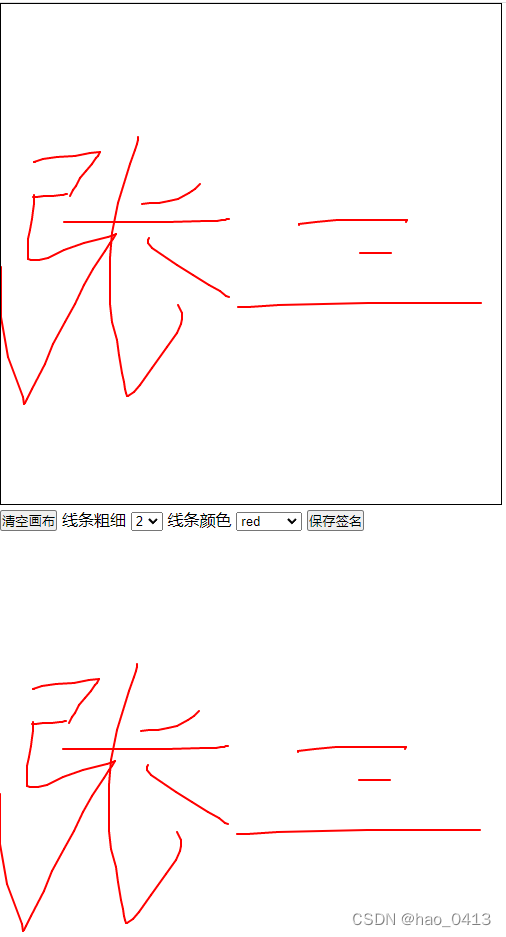
实现思路:
- 使用canvas来实现手写签名的功能,然后将canvas转化为图片
- 通过监听鼠标mousedown/mousemove/mouseup/mouseleave 来实现
html布局
html
<div class="container">
  <canvas id="canvas" width="500" height="500"></canvas>
  <div>
    <button id="clear">清空画布</button>
    线条粗细
    <select id="selWidth">
      <option value="2">2</option>
      <option value="4">4</option>
      <option value="6">6</option>
      <option value="9">9</option>
    </select>
    线条颜色
    <select id="selColor">
      <option value="red">red</option>
      <option value="blue">blue</option>
      <option value="pink">pink</option>
      <option value="orange">orange</option>
    </select>
    <button id="imgInfo">保存签名</button>
  </div>

  <div class="imgs" id="imgs"></div>
</div>css样式:
css
* {
  margin: 0;
  padding: 0;
}
## canvas {
  border: 1px solid black;
}javascript:
javascript
//1.获取canvas
var myCanvas = document.getElementById("canvas");
//获取2d对象
var ctx = myCanvas.getContext("2d");
//清空画布
var clear = document.getElementById("clear");
//线条
var selWidth = document.getElementById("selWidth");
// 颜色
var selColor = document.getElementById("selColor");
// 保存签名
var imgInfo = document.getElementById("imgInfo");
// 保存的盒子
var imgs = document.getElementById("imgs");
//控制线条是否画
var isMouseMove = false;
//线条位置
var lastX, lastY;

var widthVal = selWidth[0].value,
  colorVal = selColor[0].value;
window.onload = function () {
  initCanvas();
};
//初始化
function initCanvas() {
  //PC端
  var down = (e) => {
    isMouseMove = true;
    drawLine(
      event.pageX - myCanvas.offsetLeft,
      event.pageY - myCanvas.offsetTop,
      false
    );
  };
  let move = (e) => {
    if (isMouseMove) {
      drawLine(
        event.pageX - myCanvas.offsetLeft,
        event.pageY - myCanvas.offsetTop,
        true
      );
    }
  };
  let up = (e) => {
    isMouseMove = false;
  };
  let leave = (e) => {
    isMouseMove = false;
  };
  myCanvas.addEventListener("mousedown", down);
  myCanvas.addEventListener("mousemove", move);
  myCanvas.addEventListener("mouseup", up);
  myCanvas.addEventListener("mouseleave", leave);
}
//画线
function drawLine(x, y, isT) {
  if (isT) {
    ctx.beginPath();
    ctx.lineWidth = widthVal; //设置线宽状态
    ctx.strokeStyle = colorVal; //设置线的颜色状态
    ctx.lineCap = "round";
    ctx.lineJoin = "round";
    ctx.moveTo(lastX, lastY);
    ctx.lineTo(x, y);
    ctx.stroke();
    ctx.closePath();
  }
  // 每次移动都要更新坐标位置
  lastX = x;
  lastY = y;
}

//清空画图
function clearCanvas() {
  imgs.innerHTML = "";
  ctx.beginPath();
  ctx.clearRect(0, 0, myCanvas.width, myCanvas.height);
  ctx.closePath(); //可加入,可不加入
}
//线条粗细
function lineCrude() {
  let activeIndex = selWidth.selectedIndex;
  widthVal = selWidth[activeIndex].value;
}
//改变颜色
function setColor() {
  let activeIndex = selColor.selectedIndex;
  colorVal = selColor[activeIndex].value;
}
//保存图片
function saveImgInfo() {
  var images = myCanvas.toDataURL("image/png");
  imgs.innerHTML = `<img src='${images}'>`;
}
clear.addEventListener("click", clearCanvas);
selWidth.addEventListener("change", lineCrude);
selColor.addEventListener("change", setColor);
imgInfo.addEventListener("click", saveImgInfo);